
Over the last few years, HTML5 video evolved from a basic solution which was not a good fit for broadcasters, to a mature playback stack that can be used for the premium use cases. I personally spent a lot of time in the last few years with this transition, and in this four part series I am going to share my experience and the best practices to understand the challenges, and the best approach to overcome those. If you haven't thought about the effort of transitioning to HTML5 video yet, this should give you the background you need.
But before we go into the details, let's start at the beginning.
1.1 The History of HTML5 Video
In February 2007, Opera Software proposed the
Free Codecs
 - Theora and WebM/VP9


 - ON 2
Non-free
 - H.264


 - HEVC
The requirement to pay a licensing fee for a codec created issues for the browsers, since H.264 has been the standard codec in Flash and across devices, and HTML5 was expected to support it. While Chrome, Safari and IE eventually started to support H.264, the Mozilla Foundation with Firefox was not willing to pay a royalty fee. This was eventually resolved in 2013, when Cisco announced that they were making a binary H.264 module available for download, which Firefox was able to incorporate into their browser. This allowed the Mozilla Foundation to avoid having to pay the MPEG-LA licensing fee.
We are grateful for Cisco’s contribution, and we will add support for Cisco’s OpenH.264 binary modules to Firefox soon (Mozilla CTO, Brendan Eich).
Even though there is still fragmentation with others codecs, this lead to HTML5 finally supporting H.264 as a codec across all browsers - which was the first major hurdle to overcome.
1,2 HTML5 Feature Support by Browser
MSE and EME are the main features required for high quality HTML5. Over the last few years, support became available broadly.
Media Source Extensions (MSE)
 - Firefox November - 2015

 - Google Chrome Desktop and Android – early 2013

 - Internet Explorer – October 2013

 - Microsoft Edge – November 2015

 - Opera – June 2015

 - Safari OSX – Since Safari 8 (but still improving)
Encrypted Media Extensions (EME)
 - First deployed April 2013, Samsung Chromebook via Netflix

 - As of 2016, available on Google Chrome, Internet Explorer, Safari, Firefox and Microsoft Edge
1.3 Current Status of Flash in Browsers
While Flash will be supported in the foreseeable future, the browsers introduced measures to discourage the use of Flash. For example, Chrome announced “HTML5 by Default”, which prompts a user to allow Flash first under certain circumstances, while Apple disables Flash by default in Safari and Mac OS.
[caption id="attachment_15729" align="alignnone" width="482"]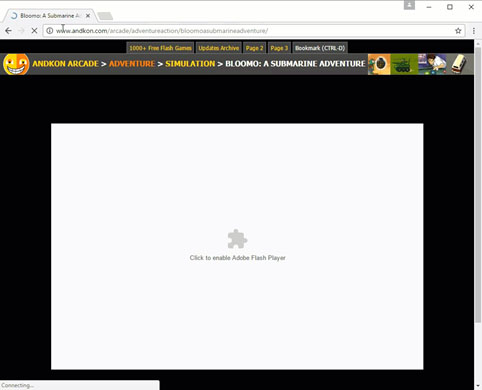 Figure 1) Google Chrome - HTML5 by Default[/caption]
1.4 HTML5 Video Compared to Flash
Here are a few high-level differences between Flash video and HTML5 video. Now, all of those can be overcome with either a good implementation, a workaround, or an adjustment in workflow.
[table id=5 /]
Later in the series, I am going to explain in more detail how to address those difference at large scale. But first, let's further examine the evolution of HTML5 video.
1.5 Media Source Extensions (MSE)
Media Source Extensions provide the foundation to make HTML5 video usable for higher end use cases, with adaptive streaming and complex video stacks similar to Flash. Specifically, this specification allows JavaScript to dynamically construct media streams for and . It defines objects that allow JavaScript to pass media segments to an HTMLMediaElement.
[caption id="attachment_15733" align="alignnone" width="1000"]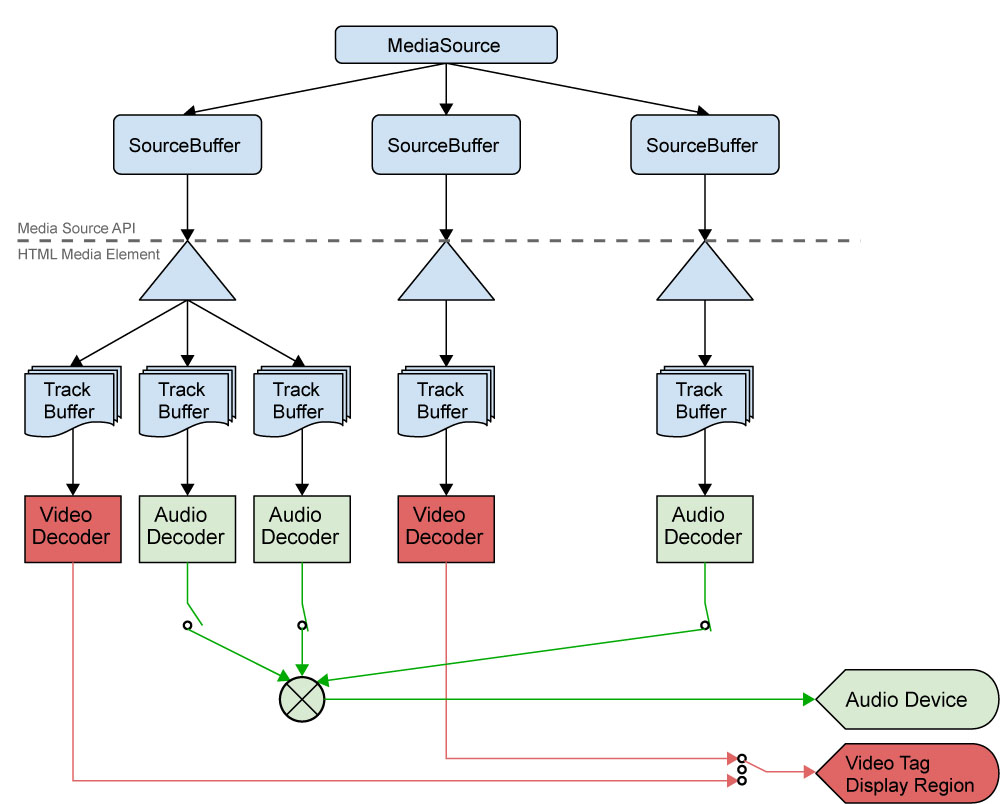 Figure 2) Overview MSE (via W3C https://www.w3.org/TR/media-source/)[/caption]
The W3C defined the following goals:
 - Allow JavaScript to construct media streams independent of how the media is fetched.


 - Define a splicing and buffering model that facilitates use cases like adaptive streaming, ad-insertion, time-shifting, and video editing.


 - Minimize the need for media parsing in JavaScript.


 - Leverage the browser cache as much as possible.


 - Provide requirements for byte stream format specifications.


 - Not require support for any particular media format or codec.
Here is a simple example:
var ms = new MediaSource();

var video = document.querySelector('video');
video.src = window.URL.createObjectURL(ms);

ms.addEventListener('sourceopen', function(e) {
  ...
  var sourceBuffer = ms.addSourceBuffer('video/webm; codecs="vorbis,vp8"');
  sourceBuffer.appendBuffer(oneVideoWebMChunk);
  ....
}, false);
(via http://html5-demos.appspot.com/static/media-source.html)
1.6 Summary
Now you are equipped with the background of the HTML5 video evolution and core concepts. In the upcoming Part 2, "Understanding security", we are going to talk about content protection, which is critical for premium content. Stay tuned.
Part 1: HTML5 Basics
Part 2: Understanding HTML5 Security
Part 3: HTML5 Deployment Best Practices - Multi-DRM, Ad Insertion, and Cross-Device Optimizations.
ARCHIVE NOTE
This article was originally published on overdigital.net and has been migrated to overdigital.ai as part of our content archive. Some links or embeds may no longer work.
Browse more archived articles